If you’ve ever spent an entire Sunday afternoon hunting for the “right” citation manager, or discovered three weeks into your literature review that you’d been using the wrong PRISMA checklist version, this guide is for you.
1. Introduction
Research today doesn’t happen with a notebook and a library card anymore. It happens across a dozen browser tabs, half-synced Google Drive folders, a reference manager you’re not quite sure you set up correctly, and at least one AI tool you’re a little nervous about citing. The modern researcher’s “toolkit” isn’t optional — it’s the infrastructure that determines whether your project moves forward smoothly or collapses under its own admin weight.
Why a digital toolkit matters: A good stack of tools saves you from the three things that quietly kill research momentum — disorganization, duplicated effort, and lost time re-doing work you already did once. The right software doesn’t just make things faster; it changes what’s even possible. Systematic reviews that once took a research team a year can now be screened in weeks. Qualitative coding that used to live in color-coded sticky notes can now be searched, cross-referenced, and exported in seconds.
Common research challenges this guide addresses:
- Where do I even start searching, and which database actually covers my field?
- How do I keep hundreds of PDFs and citations organized without losing my mind?
- Which AI tools are safe to use, and where do they get things wrong?
- How do I analyze my data without learning to code from scratch (unless I want to)?
- How do I manage deadlines, collaborators, and a thesis timeline that keeps slipping?
Who this is for: Whether you’re an undergraduate writing your first literature review, a master’s student juggling coursework and a thesis, a PhD candidate deep in a dissertation, or faculty managing multiple grants and student supervisions, the tools below are organized so you can jump straight to what’s relevant to your stage — and skip what isn’t.
2. AI Research Assistants
AI tools have become genuinely useful research companions — but they work best as assistants, not authorities. Every AI-generated summary, citation, or claim below should be cross-checked against the primary source before it goes anywhere near your paper.
| Tool | Best For | Free Plan | Strengths | Limitations | Official Website |
|---|---|---|---|---|---|
| ChatGPT | Brainstorming, drafting, code help, general Q&A | Yes (limited access to latest model) | Versatile, strong at explaining concepts and restructuring text | Can fabricate citations; verify all facts and references | openai.com/chatgpt |
| Claude | Long-document analysis, careful reasoning, writing support | Yes (usage limits) | Handles long PDFs well, thoughtful and nuanced writing | Same citation-verification caveat as any LLM | claude.com |
| Gemini | Research inside Google Workspace, quick lookups | Yes | Tightly integrated with Docs, Sheets, and Google Search | Accuracy varies by topic; check sourced claims | gemini.google.com |
| Elicit | Literature search and evidence extraction | Yes (limited monthly credits) | Pulls structured data from papers, good for evidence tables | Coverage depends on indexed database, not exhaustive | elicit.com |
| Consensus | Finding paper-backed answers to research questions | Yes (limited searches) | Shows consensus/disagreement across studies visually | Best for well-studied questions, not niche topics | consensus.app |
| Scite | Checking how a paper has been cited (supporting/contrasting) | Yes (limited) | Shows “smart citations” — how later work engaged with a paper | Subscription needed for full access | scite.ai |
| SciSpace | Reading and explaining dense papers | Yes (limited) | Simplifies jargon, good Q&A on a specific PDF | Explanations still need verification against the paper | scispace.com |
| Perplexity | Fast, cited web + academic search | Yes | Gives inline citations, good for quick fact-checking | Citations can still misrepresent source nuance | perplexity.ai |
| NotebookLM | Working with your own uploaded sources | Yes | Answers are grounded only in documents you upload, reducing hallucination | Limited to what you feed it; not a general search tool | notebooklm.google |
When to use which: Use Elicit, Consensus, or Scite when you need to survey what the literature says on a question. Use SciSpace or NotebookLM when you’re trying to understand a specific dense paper or your own set of sources. Use ChatGPT, Claude, or Gemini for brainstorming, outlining, and editing. Use Perplexity when you want a quick, cited answer to a specific question. In every case, treat the tool as a first draft of understanding, not a final source — always trace claims back to the original paper before citing it yourself.
3. Academic Search Engines
Different databases index different corners of the literature, and picking the wrong one is a common reason searches feel incomplete.
- Google Scholar — Indexes nearly everything: journal articles, theses, preprints, patents, case law. Best across all disciplines as a starting point. Free. Tip: use quotation marks for exact phrases and the “Cited by” link to trace forward citations.
- Semantic Scholar — AI-curated index strong in computer science, biomedicine, and neuroscience. Free. Tip: use its “Influential Citations” filter to separate meaningful citations from passing mentions.
- BASE (Bielefeld Academic Search Engine) — Indexes open-access repositories worldwide. Best for multidisciplinary and international/grey literature. Free. Tip: filter by document type to surface theses and reports often missed elsewhere.
- CORE — Aggregates open-access research papers globally. Good across disciplines, especially where open access matters. Free. Tip: use its API or “similar articles” feature for snowball searching.
- Dimensions — Links publications to grants, patents, and clinical trials. Strong for research impact and funding landscape analysis. Free tier plus paid institutional tiers. Tip: use the grants filter to find who’s funding work in your area.
- Lens.org — Combines scholarly and patent data. Best for STEM and innovation-focused research. Free. Tip: useful for prior-art searches before proposing novel methods.
- OpenAlex — Open, free replacement for Microsoft Academic Graph; covers all disciplines. Free. Tip: great for bibliometric and citation-network analysis via its open API.
- JSTOR — Deep archive of humanities, social sciences, and some sciences journals and books. Mostly paid/institutional, some open content. Tip: use its “Topics” tool for exploring interconnections between subjects.
- PubMed — The core index for biomedical and life sciences literature. Free. Tip: use MeSH terms rather than free text for far more precise results.
- ERIC — U.S. Department of Education’s index for education research. Free. Tip: filter by “peer-reviewed only” since ERIC includes non-peer-reviewed reports too.
- IEEE Xplore — Engineering, computer science, and electronics literature and standards. Paid/institutional. Tip: use its Boolean advanced search to combine conference and journal content.
- ScienceDirect — Elsevier’s journal and book platform, strong in life sciences, physical sciences, and health. Paid/institutional. Tip: use the “expert search” syntax for complex multi-field queries.
- SpringerLink — Broad multidisciplinary journal, book, and reference work index. Paid/institutional with some open access. Tip: filter by content type to separate book chapters from journal articles.
4. Reference Managers
| Feature | Zotero | Mendeley | EndNote | RefWorks | Paperpile |
|---|---|---|---|---|---|
| Collaboration | Shared group libraries, free | Shared groups, decent | Strong, but clunkier sharing | Built for institutional sharing | Good, especially with Google Docs |
| PDF annotation | Yes, built-in | Yes, built-in | Yes, built-in | Limited | Yes, built-in |
| Citation styles | Thousands via CSL | Thousands | Thousands, deep customization | Wide style library | Wide style library |
| Cloud sync | Free up to a storage cap | Free up to a storage cap | Paid, syncs via institution | Cloud-native | Fully cloud-based |
| Ease of use | Very beginner-friendly | Beginner-friendly | Steeper learning curve | Moderate | Very easy, especially in Chrome/Docs |
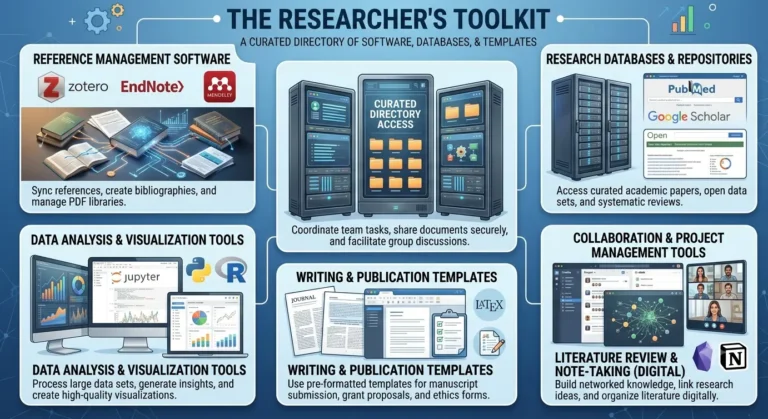
Zotero is the go-to free, open-source option and a safe default for most students. Mendeley suits those already inside the Elsevier ecosystem. EndNote remains a favorite in institutions with site licenses and complex formatting needs (common in medicine and law). RefWorks fits universities that provide it centrally. Paperpile is a strong pick for heavy Google Docs and Chrome users who want minimal setup friction.
5. Systematic Review Tools
- Rayyan — Free, browser-based title/abstract screening with blinding for multiple reviewers. Good entry point for smaller systematic reviews.
- Covidence — Full systematic review workflow: screening, extraction, risk-of-bias assessment. Popular for Cochrane-style reviews; institutional access common.
- EPPI-Reviewer — Handles screening, coding, and meta-analysis in one platform. Suited to large, complex reviews with detailed coding frameworks.
- DistillerSR — Enterprise-grade systematic review management, often used in regulatory and pharmaceutical reviews requiring audit trails.
- ASReview — Uses active-learning AI to prioritize likely-relevant papers during screening, speeding up large-volume reviews. Free and open-source.
Choose Rayyan or ASReview for lean academic projects, Covidence for standard health-sciences systematic reviews, and EPPI-Reviewer or DistillerSR when the review is large-scale, multi-reviewer, or needs strict audit documentation.
6. Data Analysis Software
Quantitative:
- SPSS — Menu-driven, ideal for students in social sciences who want statistics without coding.
- R — Free, code-based, unmatched flexibility and package ecosystem; best when you want full control and reproducibility.
- Stata — Popular in economics and epidemiology for its balance of scripting and clarity in output.
- SAS — Common in clinical trials and large institutional/enterprise data environments.
- Jamovi — Free, R-based but with a simple SPSS-like interface; great for teaching stats.
- JASP — Free, strong Bayesian statistics support in a clean graphical interface.
Qualitative:
- NVivo — Comprehensive coding, strong for mixed-methods and large qualitative datasets.
- MAXQDA — Similar strengths to NVivo with a well-regarded interface for mixed-methods research.
- ATLAS.ti — Popular for grounded theory and detailed network visualization of codes.
- Dedoose — Cloud-based, good for collaborative qualitative or mixed-methods coding across a team.
Choose SPSS or Jamovi for a first stats course, R or Stata for anything you plan to publish or reproduce, and NVivo or MAXQDA when coding interview transcripts or open-ended survey responses as a team.
7. Survey Platforms
| Feature | Qualtrics | Google Forms | SurveyMonkey | Microsoft Forms | REDCap | LimeSurvey |
|---|---|---|---|---|---|---|
| Branching logic | Advanced | Basic | Moderate | Basic | Advanced | Advanced |
| Export options | Extensive (SPSS, CSV, etc.) | CSV/Sheets | CSV, PDF | CSV, Excel | Extensive, research-grade | CSV, SPSS, R |
| Collaboration | Strong, institutional | Good via Google Workspace | Good | Good via Microsoft 365 | Built for research teams | Self-hosted, team-based |
| Free plan | Limited/institutional | Yes, generous | Limited free tier | Yes, with Microsoft account | Free for academic/clinical use | Free, open-source |
Google Forms and Microsoft Forms suit quick, informal surveys. SurveyMonkey works well for general-purpose surveys with moderate logic needs. Qualtrics and REDCap are built for rigorous academic and clinical research with complex skip logic and secure data handling. LimeSurvey is a solid free, self-hosted option when you need full control over data storage.
8. Writing & Editing Tools
- Grammarly — Grammar, tone, and clarity checking across most writing platforms.
- LanguageTool — Open-source alternative to Grammarly, strong multilingual support.
- Hemingway Editor — Flags overly complex sentences and passive voice to sharpen readability.
- Overleaf — Cloud-based LaTeX editor, essential for STEM papers and journals requiring LaTeX submission.
- QuillBot — Paraphrasing tool; useful for rephrasing your own drafts for clarity, but should never be used to disguise someone else’s work as your own or to launder plagiarized text — always cite the original source and use it as a rewriting aid, not a shortcut around proper attribution.
- DeepL Write — AI-assisted rewriting with strong performance on non-native English writing and translation-adjacent phrasing.
9. Plagiarism & Similarity Checkers
- Turnitin — Institutional access, common in universities for both instructor and student-facing checks.
- iThenticate — Similar engine to Turnitin, oriented toward researchers and publishers rather than classrooms.
- Copyleaks — AI-content and similarity detection, used by some institutions and publishers.
- PlagScan — Similarity checking often used by publishers and institutions outside the Turnitin ecosystem.
Similarity score vs. plagiarism: A similarity report shows how much of your text matches existing sources — it is not, by itself, a plagiarism verdict. Properly quoted material, correctly cited common phrases, reference lists, and even your own previously published work can all trigger high similarity scores without any actual misconduct. Plagiarism is a judgment about intent and attribution, made by a human reviewer looking at why the matched text appears — not a number generated by software.
10. Visualization Tools
- Canva — Best for posters, infographics, and general presentation graphics with minimal design skill required.
- BioRender — Purpose-built for scientific and biomedical figures (pathways, mechanisms, experimental workflows).
- Lucidchart — Best for flowcharts, org charts, and process diagrams in collaborative settings.
- draw.io — Free, flexible diagramming tool for flowcharts and technical diagrams, good for those who want a no-cost Lucidchart alternative.
- Tableau Public — Best for interactive, publishable data dashboards and exploratory data visualization.
- Flourish — Great for animated, narrative-driven charts and maps for public-facing research communication.
11. Project Management
- Trello — Simple kanban boards, good for tracking a literature review or thesis chapters at a glance.
- Notion — All-in-one workspace combining notes, databases, and task tracking; popular for organizing an entire research project in one place.
- Asana — Strong for team-based research projects with multiple collaborators and deadlines.
- ClickUp — Highly customizable, suited to researchers who want detailed task hierarchies and reporting.
- Obsidian — Note-taking built around linked, networked notes; excellent for organizing literature notes and building a personal knowledge base over a long project.
- Todoist — Lightweight task manager, good for daily deadline and to-do tracking without extra complexity.
For organizing a thesis or dissertation specifically: use Notion or Obsidian for literature notes and long-form organization, and Trello or Todoist for keeping day-to-day deadlines visible.
12. Cloud Storage & Collaboration
- Google Drive — Widely used, strong real-time collaboration in Docs/Sheets, generous free tier.
- OneDrive — Deep integration with Microsoft Office, common in institutions on Microsoft 365.
- Dropbox — Reliable file sync, popular for sharing large datasets or media files with collaborators.
- GitHub — Version control built for code, but increasingly used for reproducible research (scripts, data pipelines, manuscript drafts tracked with Git).
- OSF (Open Science Framework) — Purpose-built for research: version-controlled project storage, pre-registration, and open collaboration, free for academic use.
Version control matters most when multiple people edit the same files or when you need to track exactly what changed and when — GitHub and OSF both keep a full history of changes, letting you revert or compare versions, which is far more reliable than a folder full of “final_v3_ACTUALfinal” documents.
13. Research Templates (Download Section)
To make this guide more than just a list of links, Prism Nexus has put together a set of free, ready-to-use templates covering the most common friction points in a research project:
- Research Proposal Template
- Literature Review Matrix
- Data Extraction Sheet
- PRISMA Checklist
- Gantt Chart
- Research Timeline
- Thesis Planner
- Journal Selection Checklist
- Grant Proposal Checklist
- Conference Presentation Planner
Each template is designed to be dropped straight into your existing workflow — spreadsheet-based where a matrix helps, document-based where structured writing helps. Bookmark this section, since new templates get added as more workflow gaps come up.
14. Productivity Toolkit
Software helps you do research; these methods help you actually get through the work without burning out.
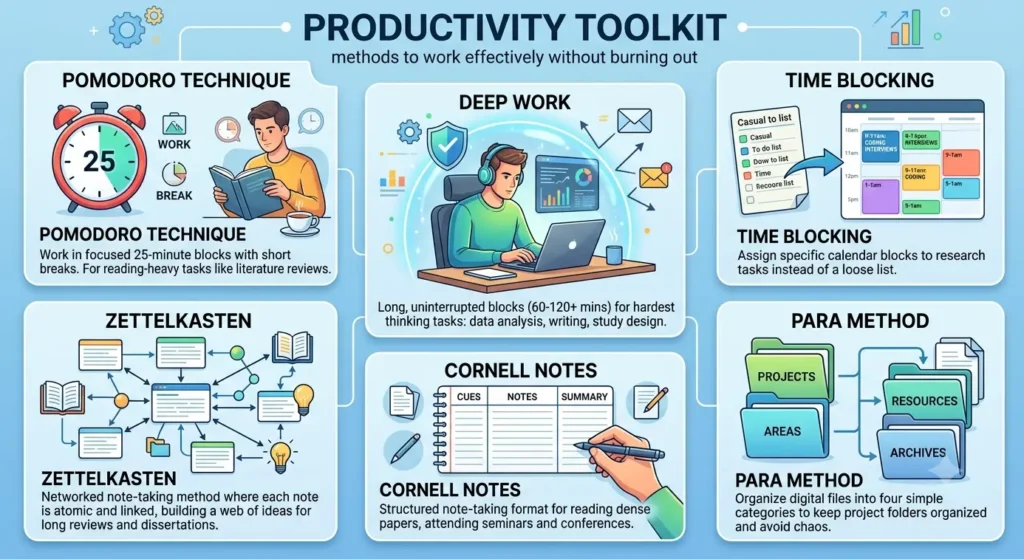
- Pomodoro Technique — Work in focused 25-minute blocks with short breaks. Useful for reading-heavy tasks like literature review, where sustained but bounded focus prevents fatigue.
- Deep Work — Long, uninterrupted blocks (60–120+ minutes) reserved for your hardest thinking tasks — data analysis, writing a results section, designing a study. Protect this time from email and messages.
- Time Blocking — Assign specific calendar blocks to specific research tasks (e.g., “9–11am: coding interview transcripts”) instead of working from a loose to-do list.
- Zettelkasten — A networked note-taking method where each note is atomic and linked to related notes, building a searchable web of ideas over time — well suited to long literature reviews and dissertations in tools like Obsidian.
- Cornell Notes — A structured note-taking format (cues, notes, summary) useful for reading dense papers or attending seminars and conferences.
- PARA Method — Organize digital files into Projects, Areas, Resources, and Archives — a simple way to keep a research project’s folders from turning into chaos.
Most researchers don’t need all six — pairing one focus method (Pomodoro or Deep Work) with one organizational method (Zettelkasten or PARA) is usually enough to meaningfully change how a project feels day to day.
Building a research toolkit isn’t about collecting every tool on this list — it’s about picking the handful that fit your discipline, your stage, and how you actually work, then sticking with them long enough that they become invisible. Start small: one search engine, one reference manager, one AI assistant you trust, and one way of organizing your time. The rest can be added as the project demands it.