The $10,000 Mistake: Wrong Tool, Wrong Time
Sarah spent six months manually organizing 400 research papers in Word documents with hand-typed citations. When her advisor requested a different citation format for journal submission, she faced 80 hours of reformatting work.
Her colleague James? He used Zotero from day one. Citation format change? Three clicks. Time spent: 30 seconds.
The difference wasn’t intelligence or work ethic. It was using the right tool at the right time.
According to research on PhD productivity, PhD students who integrate appropriate academic research tools strategically can save hundreds of hours throughout their doctoral experience while improving accuracy and reducing stress.
However, workflow research reveals that without structure, PhD students waste time, repeat mistakes, and stall progress. The right tools cut friction so you can focus on real work instead of busywork.
In this comprehensive guide, we’ll explore exactly which tools to use at each stage of your PhD journey, how to integrate them effectively, and common mistakes to avoid.
Understanding the PhD Research Workflow
Before selecting tools, understand your research journey’s distinct phases. Each phase has different needs requiring specific tools.
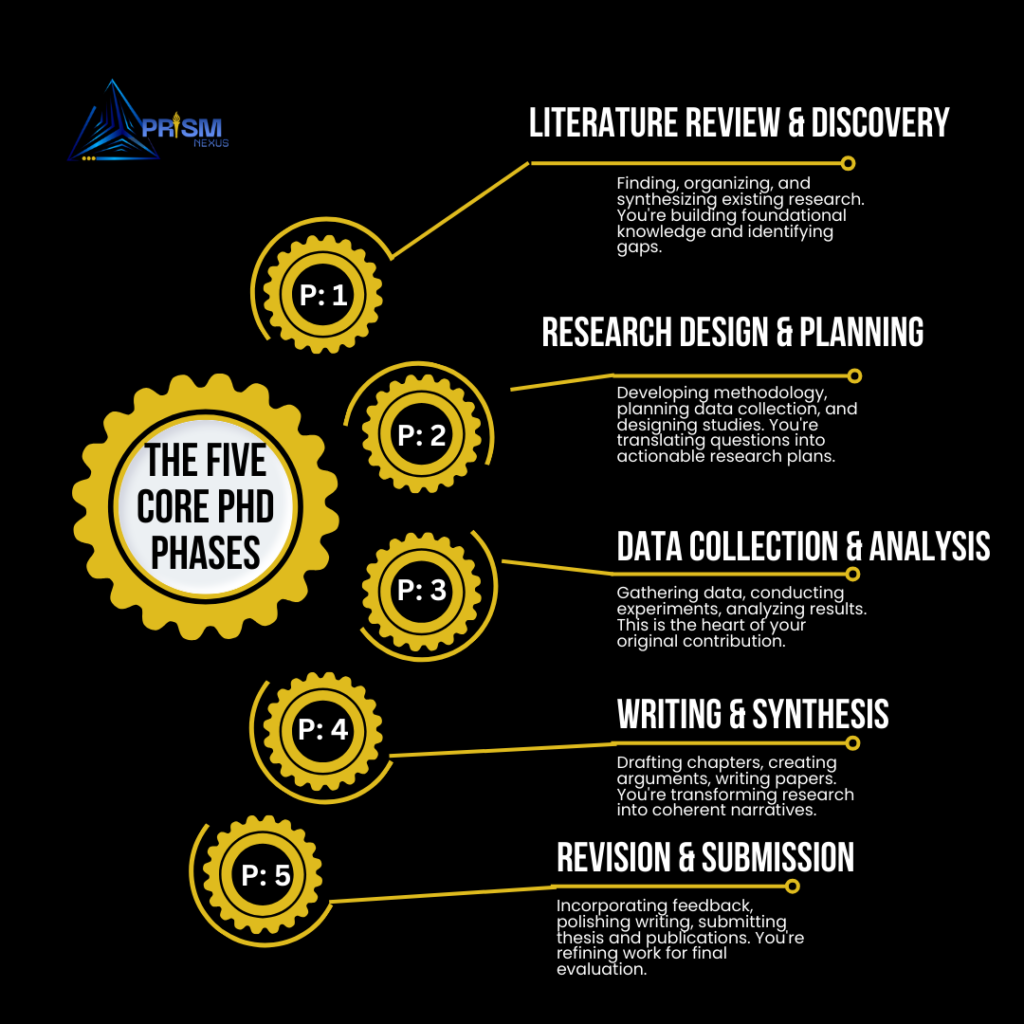
The Five Core PhD Phases
Phase 1: Literature Review & Discovery (Months 1-6)
Finding, organizing, and synthesizing existing research. You’re building foundational knowledge and identifying gaps.
Phase 2: Research Design & Planning (Months 6-12)
Developing methodology, planning data collection, and designing studies. You’re translating questions into actionable research plans.
Phase 3: Data Collection & Analysis (Months 12-30)
Gathering data, conducting experiments, analyzing results. This is the heart of your original contribution.
Phase 4: Writing & Synthesis (Months 24-42)
Drafting chapters, creating arguments, writing papers. You’re transforming research into coherent narratives.
Phase 5: Revision & Submission (Months 36-48)
Incorporating feedback, polishing writing, submitting thesis and publications. You’re refining work for final evaluation.
These phases overlap considerably. Workflow experts emphasize that building systems early pays dividends throughout your PhD journey.
The Top 5 Essential Tools Every PhD Student Needs
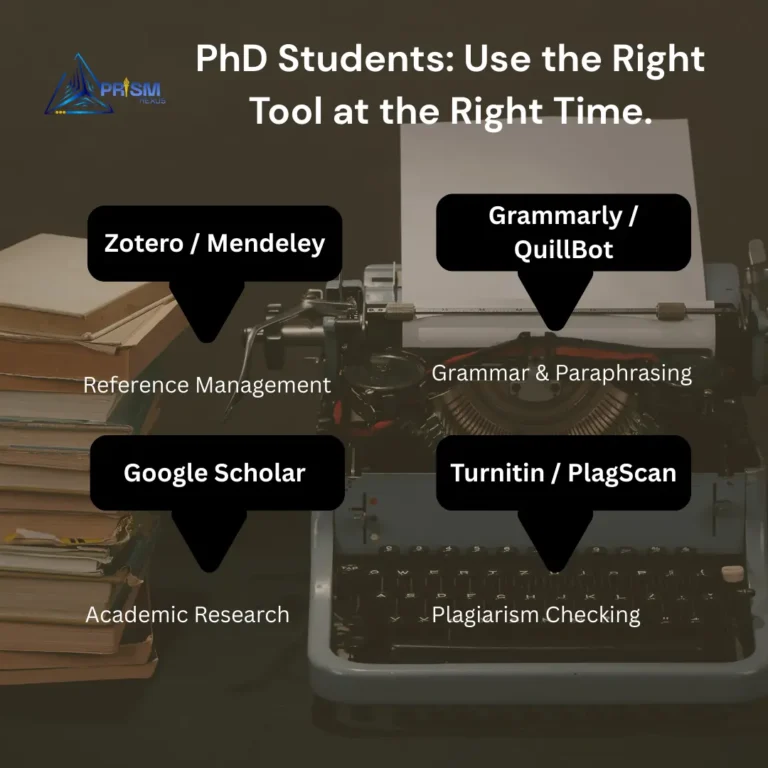
Based on the reference images you provided and comprehensive research, five core tools form the foundation of effective PhD workflows.
Zotero / Mendeley – Reference Management
When to use: From day one of your PhD through final submission
Purpose: Save, organize, and cite research papers easily
According to tool comparisons, Zotero is free and open-source, perfect for researchers needing simple but powerful reference organization. You can sync libraries across devices and organize references into collections.
Key features: → Browser extension saves papers with one click
→ Automatic PDF metadata extraction
→ Organize into folders and tags
→ Generate citations in any format instantly
→ Sync across devices
→ Share libraries with collaborators
Right time to start: Before reading your first paper. Every delay makes migration harder as your library grows.
Common mistake: Waiting until you have “a lot of papers” to organize. Start immediately, even with just 5-10 papers.
Furthermore, research emphasizes that Zotero removes one of PhD students’ greatest stresses—losing sources or handwriting citations.
Grammarly / QuillBot – Grammar & Paraphrasing
When to use: During all writing phases, from first drafts through final edits
Purpose: Improve writing quality and avoid plagiarism
PhD app research notes that Grammarly isn’t just a spellchecker—it’s your writing assistant. Whether drafting research papers or responding to peer reviews, this app enhances productivity.
Key capabilities: → Grammar and spelling correction
→ Style and tone suggestions
→ Clarity improvements
→ Plagiarism detection
→ Academic writing mode
→ Citation format checking
Right time to use:
- First drafts: Basic grammar checking
- Revision: Style and clarity improvements
- Final polish: Comprehensive review before submission
- Paraphrasing: QuillBot helps rephrase text avoiding plagiarism
Integration tip: Use Grammarly’s plugin in Overleaf or Word to ensure writing is concise and professional before submitting to journals.
Google Scholar – Academic Research
When to use: Throughout literature review and when finding recent publications
Purpose: Find scholarly articles and trusted sources
Research databases guide emphasizes that Google Scholar provides access to vast databases of academic research across disciplines. It’s user-friendly and allows efficient searching for conducting literature reviews and staying updated.
Strategic uses: → Initial topic exploration
→ Finding seminal papers
→ Tracking citation networks
→ Setting up alerts for new research
→ Locating open-access versions
→ Checking citation counts
Right timing workflow:
- Start broad with Google Scholar
- Identify key papers
- Import to Zotero/Mendeley
- Use citation tracking to find related work
- Set alerts for ongoing monitoring
Pro tip: Don’t rely solely on Google Scholar. Supplement with discipline-specific databases for comprehensive coverage.
Turnitin / PlagScan – Plagiarism Checking
When to use: Before every submission to advisors, committees, or journals
Purpose: Ensure content is 100% original
The reference images correctly identify plagiarism checking as essential for PhD students. According to academic integrity research, ensuring originality protects your academic reputation and meets institutional requirements.
When to check: → After completing first drafts
→ Before sharing with advisors
→ Prior to conference submissions
→ Before journal manuscript submission
→ After major revisions
→ Final thesis submission
Right approach:
- Run checks early enough to fix issues
- Understand that some similarity is normal (quotes, common phrases)
- Focus on paraphrasing flagged sections
- Document all sources properly
- Use university-provided tools when available
Critical timing: Submit to plagiarism checkers at least 1 week before deadlines, allowing time to address any identified issues.
ChatGPT / AI Tools – Idea Generation & Structure
When to use: For brainstorming, organizing, and editing content
Purpose: Get help brainstorming, organizing, or editing content
Emerging tool research shows that AI tools like ChatGPT accelerate content creation for researchers.
Appropriate uses: → Brainstorming research questions
→ Outlining papers or chapters
→ Explaining complex concepts differently
→ Generating literature review structures
→ Identifying potential methodological approaches
→ Proofreading and editing suggestions
Wrong uses (ethical violations):
- Writing complete sections without attribution
- Generating data or fabricating results
- Creating fake citations
- Submitting AI-generated work as your own
Right timing and approach:
- Use AI for ideation and structure
- Generate outlines and frameworks
- Write content yourself based on your research
- Use AI to refine and improve your writing
- Always disclose AI assistance per institutional policies
According to AI ethics guidance, AI tools are assistants, not decision-makers. Validate suggestions manually and maintain academic integrity.
Advanced Tools for Specific PhD Tasks
Beyond the core five, specialized tools optimize specific workflow components.
Data Extraction for Literature Review
Tools: SciSpace, Elicit, Research Rabbit
When to use: During systematic literature reviews
According to advanced tool research, Elicit is one of the most advanced research productivity tools designed to simplify literature review processes.
Capabilities:
- Find relevant studies using natural language queries
- Summarize papers automatically
- Extract key findings across multiple papers
- Identify patterns in research
- Highlight methodologies and limitations
Workflow integration:
- Start literature review with broad Elicit queries
- Screen and synthesize results
- Export citations to Zotero
- Use Research Rabbit to visualize citation networks
- Identify gaps for your research contribution
Research emphasizes that Elicit transforms the painful process of reading hundreds of abstracts into organized, intelligent workflows.
Finding Citations for Papers
Tools: Liner, Litmaps, Connected Papers
When to use: When building bibliography or exploring research networks
Right timing:
- After identifying core papers in your field
- When expanding literature review
- Before writing background sections
- When reviewers request additional citations
How these tools work:
→ Liner: Highlights and annotates papers while reading
→ Litmaps: Creates visual citation maps
→ Connected Papers: Shows relationships between papers
Furthermore, visual mapping helps identify underexplored areas and ensures comprehensive literature coverage.
Understanding Complex Research
Tools: Ponder, Explain Paper, SciSpace
When to use: When struggling to understand difficult papers
Tool research indicates that understanding papers, especially those outside your immediate expertise, can be time-consuming.
Use cases:
- Papers using unfamiliar methodologies
- Highly technical mathematics or statistics
- Interdisciplinary research combining multiple fields
- Papers with complex theoretical frameworks
Right approach:
- Read paper first attempting to understand independently
- Use AI tools to explain confusing sections
- Verify explanations against original text
- Discuss with advisors or colleagues for confirmation
Important caveat: These tools supplement, not replace, deep reading and critical thinking.
Converting Papers to Posters
Tools: Bohrium, Canva, PowerPoint
When to use: For conference presentations
Timeline:
- 2-3 weeks before conference
- After receiving abstract acceptance
- When you have preliminary results to share
Right workflow:
- Outline key points (introduction, methods, results, conclusions)
- Create visual hierarchy
- Design in poster tool
- Get feedback from advisors and colleagues
- Print with sufficient lead time
Identifying Papers for Literature Review
Tools: Jenni AI, Semantic Scholar, Dimensions
When to use: Beginning literature review or finding recent work
According to workflow guides, starting with thorough literature review builds foundational knowledge essential for research design.
Strategic approach:
- Use multiple databases for comprehensive coverage
- Set up alerts for ongoing monitoring
- Focus on recent papers (last 5 years) plus seminal works
- Check reference lists of key papers (backward citation)
- Check papers citing key papers (forward citation)
Peer Review of Manuscripts
Tools: Review-it, Publons, Peer Review Process Manager
When to use: When submitting work or reviewing others’ papers
Right timing for seeking reviews:
- After completing first full draft
- Before submitting to journals
- After major revisions
- When advisors have reviewed once (get fresh eyes)
Benefits: → Identifies blind spots
→ Catches errors you’ve missed
→ Provides reader perspective
→ Strengthens arguments
→ Improves clarity
Data Analysis Tools
Tools: AnswerThis, NVivo, MAXQDA, SPSS, R, Python
When to use: During data collection and analysis phases
Analysis tool research shows that NVivo is one of the most widely used PhD research software tools for qualitative and mixed-methods analysis.
Tool selection by data type:
Qualitative data (interviews, text):
- NVivo for coding and thematic analysis
- MAXQDA for multimedia analysis
- ATLAS.ti for grounded theory
Quantitative data (surveys, experiments):
- SPSS for user-friendly statistical analysis
- R for advanced statistics and reproducibility
- Python for data science and machine learning
Mixed methods:
- Combine tools based on specific components
- Use NVivo for qualitative then SPSS/R for quantitative
Right timing: Learn your primary analysis tool early (within first year), allowing time for proficiency before analyzing dissertation data.
Writing and Productivity Tools
Writing constitutes a major portion of PhD work. These tools optimize the writing process.
Research Paper Writing
Tools: AnswerThis, Scrivener, Overleaf, Word
When to use: Throughout writing phases
According to PhD writing workflows, Overleaf is always at the top for writing papers. It’s a collaborative LaTeX editor that removes trouble from managing packages and formatting.
Tool selection criteria:
Use Overleaf/LaTeX when:
- Writing math-heavy papers
- Formatting complex equations
- Submitting to journals requiring LaTeX
- Collaborating with LaTeX users
- Creating professional-looking documents
Use Microsoft Word when:
- Collaborating with non-LaTeX users
- Working in humanities or social sciences
- Institutional requirements specify Word
- Using track changes extensively
Use Scrivener when:
- Writing long documents (dissertations)
- Organizing complex chapter structures
- Managing research materials alongside writing
- Needing flexible organization
Writing tool research emphasizes creating systems that save hours of work each day without forgetting what you read.
Grammar and Typo Checking
Tools: Paperpal, Grammarly, ProWritingAid
When to use: At multiple writing stages
Strategic timing:
- First draft: Basic grammar only
- Second draft: Grammar + clarity
- Pre-submission: Comprehensive check
- Post-feedback: Addressing reviewer concerns
Furthermore, writing enhancement research notes that premium versions offer advanced features like academic tone adjustment and discipline-specific terminology suggestions.
Note-Taking and Organization
Tools: Notion, Obsidian, OneNote, Evernote
When to use: Throughout your entire PhD
According to note-taking research, Obsidian might be the tool that changed thinking the most. It’s built around Markdown files and powerful graph-based linking systems.
Tool comparison:
Notion:
- Best for: Project management + note-taking combined
- Strength: Flexible databases and views
- Use for: Research dashboards, timelines, task tracking
Obsidian:
- Best for: Interconnected knowledge building
- Strength: Linking notes creating second brain
- Use for: Literature notes, concept mapping, Zettelkasten method
OneNote:
- Best for: Digital notebook feel
- Strength: Handwriting support, multimedia
- Use for: Meeting notes, quick captures
Evernote:
- Best for: Cross-device syncing, web clipping
- Strength: Search and organization
- Use for: Research article highlights, general notes
Right approach: Choose one primary note-taking system and stick with it. Switching mid-PhD causes migration headaches and lost information.
Project and Task Management
Tools: Trello, Todoist, Asana, Notion
When to use: For tracking deadlines, tasks, and long-term goals
Task management research emphasizes that Trello is a versatile app for PhD students handling multiple tasks.
Use cases: → Breaking dissertation into manageable tasks
→ Tracking submission deadlines
→ Managing multiple projects simultaneously
→ Coordinating with advisors and collaborators
→ Planning conference attendance
→ Organizing coursework and teaching duties
Workflow setup:
- Create boards for major projects (dissertation, teaching, service)
- Break down into specific tasks with deadlines
- Review weekly and adjust priorities
- Use calendar integration for time-based tasks
- Archive completed tasks for progress tracking
According to workflow research, tracking long-term milestones ensures steady progress toward completion.
Building Your Integrated PhD Workflow
Individual tools provide value, but integration creates transformation. Here’s how to build a cohesive system.
The Complete PhD Tool Stack
Integrated workflow research demonstrates how tools working together transform entire research processes:
Phase 1: Literature Discovery
- Search Google Scholar + discipline databases
- Save to Zotero with browser extension
- Use Elicit for systematic synthesis
- Map connections with Research Rabbit
- Annotate PDFs in Zotero
Phase 2: Note-Taking and Synthesis
- Extract key points from papers
- Create literature notes in Obsidian/Notion
- Link related concepts
- Build permanent notes synthesizing ideas
- Tag by themes and concepts
Phase 3: Writing and Drafting
- Outline in Scrivener or Notion
- Write in Overleaf/Word
- Cite using Zotero plugin
- Check grammar with Grammarly
- Get AI suggestions for clarity (ChatGPT)
Phase 4: Analysis and Results
- Organize data systematically
- Analyze in NVivo/SPSS/R/Python
- Create visualizations
- Document analysis decisions
- Archive raw and processed data
Phase 5: Revision and Submission
- Incorporate feedback systematically
- Check plagiarism with Turnitin
- Verify all citations
- Format according to guidelines
- Submit with confidence
Avoiding Common Integration Mistakes
Tool Overload
Using 15+ tools creates confusion and overhead.
Solution: Stick to 5-7 core tools that integrate well. Quality over quantity.
Starting Too Late
Implementing systems in year 3 means migrating existing work.
Solution: Set up core tools (Zotero, note-taking, task management) in month 1.
No Backup Strategy
Trusting single tools without backups risks catastrophic data loss.
Solution: Use cloud sync + local backups + external hard drives. Follow 3-2-1 rule.
Ignoring Learning Curves
Expecting instant proficiency leads to frustration and abandonment.
Solution: Invest time upfront learning tools thoroughly. Benefits compound over years.
Not Customizing Workflows
Copying others’ workflows without adaptation creates friction.
Solution: Start with recommended tools but customize to your specific needs and preferences.
Discipline-Specific Tool Recommendations
Different fields have unique needs requiring specialized tools.
STEM (Science, Technology, Engineering, Math)
Essential additions:
- LaTeX/Overleaf: Standard for technical writing
- MATLAB/Python/R: Data analysis and visualization
- Jupyter Notebooks: Reproducible computational research
- Git/GitHub: Version control for code
- Wolfram Alpha: Mathematical computations
Humanities and Social Sciences
Essential additions:
- NVivo/MAXQDA: Qualitative data analysis
- Scrivener: Long-form writing organization
- Zotero: Especially good for diverse source types
- Word: Often required by publishers
- Tropy: Photo organization for archival research
Experimental Sciences
Essential additions:
- Electronic lab notebooks: Benchling, LabArchives
- Data visualization: Tableau, Plotly
- Statistical software: SPSS, SAS, Stata
- Image analysis: ImageJ, FIJI
- Protocol repositories: protocols.io
Common Tool-Related Problems and Solutions
Even with right tools, problems arise. Here’s how to troubleshoot common issues.
Problem #1: Citation Format Nightmares
Symptom: Hours spent manually reformatting citations
Solution:
- Use Zotero/Mendeley from beginning
- Install word processor plugins
- Verify citation styles before extensive writing
- Keep Zotero library updated and clean
Problem #2: Lost Files and Data
Symptom: Can’t find important documents or data
Solution: → Implement consistent file naming conventions
→ Use centralized cloud storage (Dropbox, Google Drive)
→ Maintain organized folder structure
→ Regular backups to multiple locations
→ Document file organization system
Problem #3: Overwhelming Number of Papers
Symptom: Drowning in PDFs, can’t remember what you read
Solution:
- Tag papers immediately upon saving
- Write brief summary notes for each paper
- Use Zotero notes feature
- Create thematic collections
- Regular review and consolidation
Problem #4: Procrastination and Distraction
Symptom: Spending more time organizing tools than working
Solution:
- Set time limits for tool setup and maintenance
- Use focus tools (Forest app, Freedom, RescueTime)
- Block distracting websites during work sessions
- Establish clear daily writing goals
- Recognize when tool exploration becomes avoidance
Problem #5: Incompatible Collaboration Tools
Symptom: Collaborators use different tools causing friction
Solution:
- Establish tool agreements early in collaborations
- Use universally compatible formats (PDF, DOCX)
- Export from your preferred tools to shared formats
- Consider collaborators’ preferences for shared work
- Maintain personal organization separate from shared
The 30-Day PhD Tool Setup Challenge
Transform your workflow systematically with this implementation plan.
Week 1: Foundation Setup
Days 1-2: Install and configure Zotero
- Create account and install desktop app
- Install browser connector
- Set up first collection folders
- Save 10 papers to practice
Days 3-4: Set up note-taking system
- Choose between Notion/Obsidian/OneNote
- Create initial structure
- Practice capturing notes from papers
- Link to Zotero library
Days 5-7: Implement task management
- Set up Trello/Todoist
- Create boards for major projects
- Add current tasks and deadlines
- Establish weekly review habit
Week 2: Writing Tools
Days 8-10: Configure writing environment
- Set up Overleaf or Word with templates
- Install Grammarly or equivalent
- Connect Zotero citation plugin
- Write practice paragraph with citations
Days 11-12: Data analysis preparation
- Identify required analysis software
- Install and explore basic functions
- Complete introductory tutorial
- Plan analysis workflow
Days 13-14: Backup and security
- Set up cloud storage sync
- Create external backup schedule
- Test file recovery process
- Document backup procedures
Week 3: Advanced Integration
Days 15-17: Literature review enhancement
- Explore Elicit or Research Rabbit
- Create first literature map
- Connect to existing Zotero library
- Identify research gaps
Days 18-20: Collaboration setup
- Configure sharing in relevant tools
- Test collaborative editing
- Establish communication channels (Slack/Discord)
- Define collaboration protocols
Days 21: Mid-challenge review
- Assess what’s working
- Identify friction points
- Adjust as needed
- Celebrate progress
Week 4: Optimization and Habits
Days 22-24: Workflow refinement
- Streamline daily routine
- Create templates for common tasks
- Automate repetitive processes
- Optimize tool integration
Days 25-27: Habit establishment
- Set consistent work schedules
- Practice daily tool usage
- Build automatic behaviors
- Track progress
Days 28-30: Documentation and planning
- Document your complete workflow
- Create quick reference guides
- Plan ongoing tool learning
- Commit to continuous improvement
Master Your Tools, Master Your PhD
The difference between PhD students who thrive and those who struggle often comes down to workflow efficiency. Using the right tool at the right time isn’t about having the newest software—it’s about strategic implementation of proven systems.
Key principles to remember:
Start early with core tools. Setting up Zotero, note-taking, and task management in month one prevents painful migration later.
Integrate rather than accumulate. Five well-integrated tools beat fifteen disconnected ones.
Customize thoughtfully. Adapt recommended workflows to your specific needs and preferences.
Invest in learning. Upfront time learning tools pays exponential dividends over 4-6 years.
Maintain flexibility. Tools evolve, needs change. Periodically reassess and adjust.
Focus on work, not tools. Tools serve your research; don’t let organization become procrastination.
According to comprehensive tool research, researchers who thrive in 2025 combine deep thinking with smart, tech-assisted workflows. These tools don’t substitute brains or imagination—they enhance them.
Your PhD journey is challenging enough without fighting your tools. Implement the right systems early, integrate them thoughtfully, and focus your energy on what matters: advancing knowledge in your field.
The tools are ready. The workflows are proven. Now it’s time to build your PhD success system.
Ready to Optimize Your PhD Workflow?
At PRISM Nexus, we help PhD students and researchers develop efficient workflows and master essential research tools for maximum productivity.
Our services include:
→ Tool training – Personalized instruction on research software
→ Workflow design – Custom systems for your research needs
→ Productivity coaching – Strategies for efficient research
→ Literature review support – Systematic search and synthesis
→ Writing guidance – From drafts to publications
→ Data analysis consulting – Methodological expertise
Contact us today to build a workflow that accelerates your PhD success.
Frequently Asked Questions
Q: Are free tools sufficient or should I pay for premium versions?
A: Free versions of Zotero, Google Scholar, basic Grammarly, and many other tools suffice for most PhD students. Consider premium when: (1) free version limits become constraints, (2) advanced features directly support your research, or (3) time saved justifies cost. Many universities provide institutional access to premium tools—check before purchasing.
Q: What if my advisor uses different tools than recommended?
A: Maintain flexibility for collaboration while keeping personal organization separate. For shared work, adapt to advisor preferences (e.g., Word if they use track changes). For personal organization, use tools that work best for you (e.g., Zotero for citations, Notion for notes). Export to compatible formats when sharing.
Q: How much time should I spend learning new tools?
A: Invest 2-4 weeks upfront intensively learning core tools, then continuous improvement throughout your PhD. Front-load learning with tutorials and practice before high-stakes usage. Budget 1-2 hours weekly for tool optimization and skill development. The time investment pays back many times over.
Share this guide with fellow PhD students to help them build efficient workflows and use the right tools at the right time for research success.